Manage: Domain: Settings: Connect Hosting
The 'Manage >> yourdomain.com >> Settings >> Connect Hosting' section is used to configure your ads.txt hosting. This service is provided as an alternative to hosting your own ads.txt file and works by redirecting visitors to your ads.txt file to the file hosted on our servers.
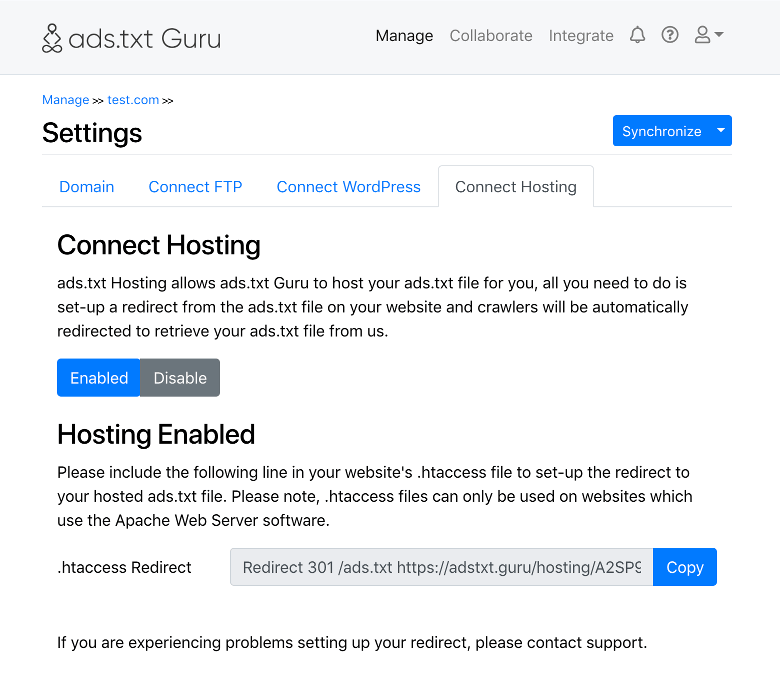
To use the 'Connect Hosting' functionality simply select to enable the feature via the 'Connect Hosting' section, and then add the redirect directive to your website's .htaccess file.
If you have an existing .htaccess file, simply add the redirect directive provided in the 'Connect Hosting' section to your existing .htaccess file. The directive can be placed anywhere in your .htaccess file, however if you have complex mod_rewrite directives in place we recommend placing it before these.
If you do not have an existing .htaccess file, simply create a text file called '.htaccess' using your favorite text editor and add the rewrite directive, then upload the file to the directory which would normally contain your ads.txt file at the root of your domain.
Please note, .htaccess files are only supported by servers which are using the Apache Web Server software. If your server uses a different web server such as IIS or nginx, please consult the relevant documentation for how to create a redirect - we will be happy to offer you support doing so.
If you disable the ads.txt hosting feature please ensure you remove the redirect directive from your .htaccess file as your hosted ads.txt file will return a '404 File Not Found' error until the hosting is re-enabled.
If you experience any difficulty setting up the redirect, please contact support.
Usage Documentation
- Collaborate
- Collaborate: Collaborator Certification
- Collaborate: Group
- Collaborate: Group: Settings
- Getting Started Guide for Ad Networks
- Getting Started Guide for Publishers
- Manage
- Manage: Domain
- Manage: Domain: Settings
- Manage: Domain: Settings: Connect FTP
- Manage: Domain: Settings: Connect Hosting
- Manage: Domain: Settings: Connect WordPress
- Manage: Domain: Verify Domain